Rustic White Solid Wood TV Stand: Style and Fit Guide
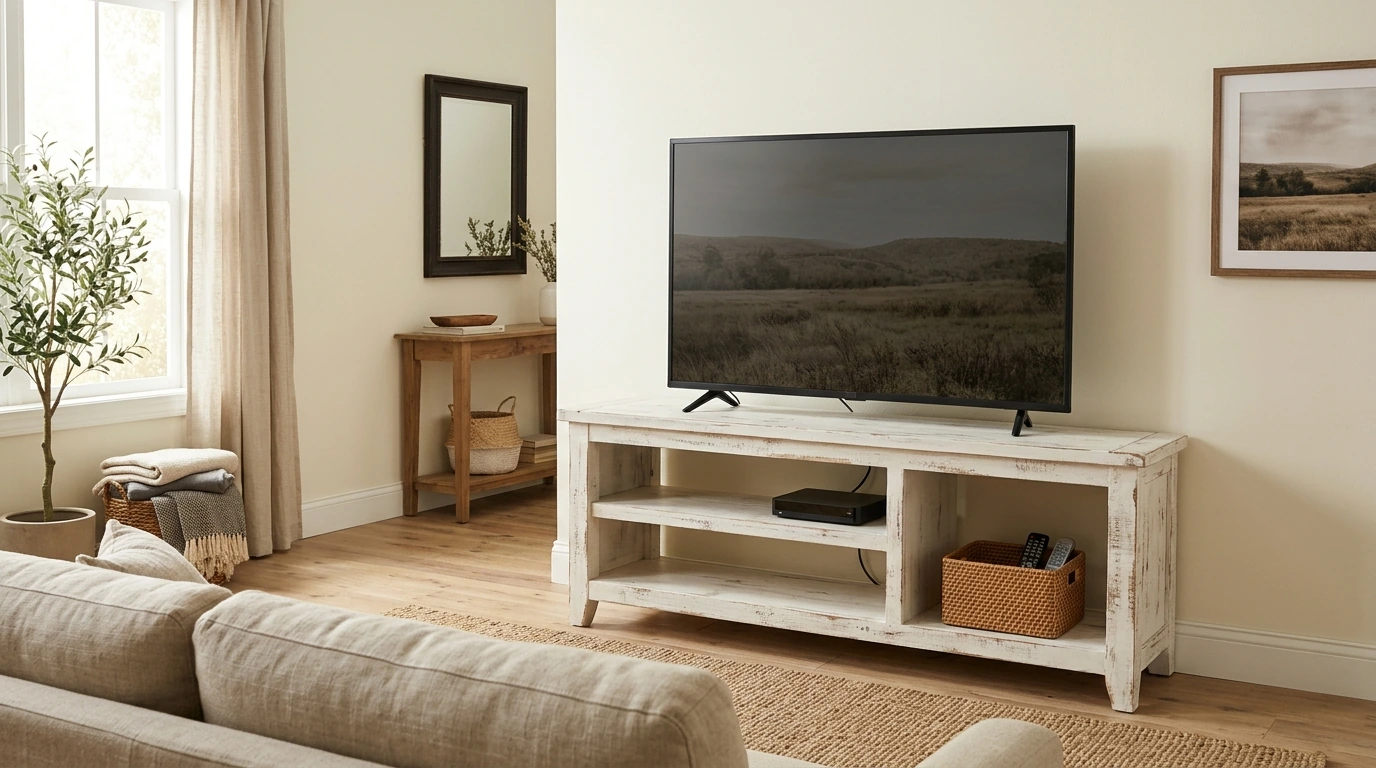
A TV stand can do more than hold a screen. It can bring warmth to the room, give everyday media essentials a place to land, and help the entertainment area feel considered rather than crowded. Our rustic white solid wood stand pairs a light, lived-in look with the character of wood. Before you bring it home, consider both how the finish will work with your room and how the stand will fit your TV and floor plan.
Why a distressed white finish works
A large television can feel visually heavy, especially against a pale wall. A distressed white stand helps soften the area beneath it without disappearing into the background. The finish feels at home in farmhouse and cottage rooms, but it can also work with coastal textures or transitional furniture that mixes traditional shapes with cleaner lines.
You do not need to match every white surface in the room. Warm neutrals, woven baskets, linen, and natural wood can make the finish feel intentional. A few darker accents—a lamp base or a picture frame, for example—can connect the stand to the TV screen. Solid wood brings its own character to the piece; let the rustic white finish be the unifying element rather than expecting every wood surface nearby to match.
Check the fit before you bring it home
Start with the space, not the TV label. Measure the wall and the floor area where you want the stand, then account for walkways, swinging doors, and nearby furniture. A stand that fits along a wall may still feel crowded if it interrupts the route through the living room.
A TV’s advertised screen size measures the screen diagonally. It does not tell you the television’s overall width or the footprint of its base. Compare those actual measurements with the stand’s published dimensions and usable top surface. Also confirm the stand’s stated weight capacity against the weight of your TV and anything else you plan to place on it. If you use a game console, streaming device, or receiver, allow the ventilation space specified for that equipment.
| Measure or check | Why it matters | What to compare |
|---|---|---|
| Wall space | Keeps the arrangement from feeling cramped | Stand width plus room beside it |
| TV base | Helps the television sit securely | Base footprint versus usable stand surface |
| Viewing height | Supports comfortable seating | Screen position when seated |
| Equipment space | Makes daily use easier | Device dimensions and ventilation needs |
It also helps to test the viewing position before ordering. Sit where you normally watch TV and picture where the screen will be once it is on the stand. That quick check can reveal whether the setup will feel comfortable from your sofa or chairs.
Make the entertainment area feel put together
Give the screen some breathing room. If space permits, a small plant, a short stack of books, or one low decorative object can add personality without competing with what you are watching. Keeping taller pieces away from the edges of the screen makes the arrangement feel calmer.
For loose remotes, controllers, and accessories, try a separate basket or organizer that suits your room. Gather cords behind the entertainment area with appropriate cable ties or sleeves, leaving enough slack to move equipment safely. Keep cords out of walkways, away from heat sources, and clear of ventilation openings. A little organization makes the room easier to use every day, not just nicer to look at.
A closer look at our rustic white stand
Our featured option is the Rustic White Solid Wood 65″ TV Stand with Distressed Finish. Its solid wood construction, rustic white color, and distressed finish make it a natural choice when you want the TV area to feel warm and relaxed. The light finish can sit alongside existing wood tones without requiring you to replace the rest of your furniture.
The name alone cannot settle whether a particular television or media setup will fit. Before purchasing, review the product page for current dimensions, configuration, price, and availability, and compare its specifications with your equipment. That way, you can choose it for its look while making sure it meets the practical needs of your room.
Keep safety part of the setup
Place the stand and TV on a level surface, and follow each manufacturer’s instructions for placement and anchoring. Do not assume anchoring hardware is included. In homes with children, take particular care with tip-over prevention; the U.S. Consumer Product Safety Commission offers guidance through its Anchor It! furniture and TV tip-over prevention program.
If pets share your living room, keep their usual paths in mind when arranging cords and accessories. For broader household planning beyond the entertainment area, our Everyday Pet Safety Kit offers pet-proofing guides and a checklist. It is a separate resource, not a substitute for the TV and stand manufacturers’ setup instructions.
FAQ
Will a 65-inch TV fit on this stand?
A 65-inch label describes the screen’s diagonal, not the TV’s overall width or base size. Compare your television’s actual dimensions and weight with the stand’s published dimensions, usable surface, and weight capacity.
What decor goes with a distressed white TV stand?
Warm wood tones, woven textures, soft neutrals, and a few restrained dark accents all work well. Keep objects near the screen low and uncluttered.
Does a solid wood TV stand still need to be anchored?
Solid wood does not replace safe setup. Follow the stand and TV manufacturers’ instructions and consult CPSC tip-over prevention guidance, especially if children live in or visit your home.










Leave a comment